Ad. When you purchase through links we provide, we may receive an affiliate commission. Here's how it works.
Best Robot Vacuum for Multiple Floors in 2026
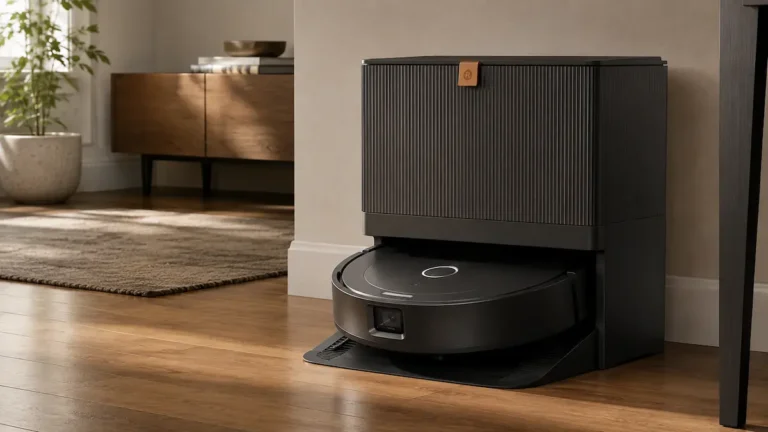
TL;DR: The best robot vacuum for multiple floors is the Roborock Qrevo CurvX — it stores up to 4 saved floor maps, automatically re-localizes when you move it between levels, and its retractable LiDAR lets it slide under low furniture on every floor.
If budget isn’t a concern, the Roborock Saros 20 is the premium pick: it climbs double-layer thresholds up to 3.46 inches combined (manufacturer claim), so transition strips between rooms are less likely to stop it.
Need a lower-cost option? The Dreame D20 Air Plus saves up to 4 floor maps (manufacturer claim) and empties itself into a 4 L dust bag.
Quick Picks — Top Robot Vacuums for Multiple Floors
- Roborock Qrevo CurvX: Best overall: 4 saved maps, 22,000 Pa suction, retractable LiDAR fits under low furniture on any level
- Roborock Saros 20: Best premium, with 36,000 Pa suction (manufacturer claim), 300+ recognized obstacle types and double-layer threshold climbing
- Dreame L40 Ultra: Best for large multi-floor homes: 4 maps, 11,000 Pa, 149°F mop washing, excellent value when on sale
- Eufy Omni S2: Best mopping across floors: HydroJet 2.0 roller mop, 5 floor maps, 12-in-1 UniClean Station
- Roborock Qrevo S5V: Best mid-range: 12,000 Pa, FlexiArm edge mopping, solid multi-floor performance
- Dreame D20 Air Plus: Best budget: up to 4 floor maps, 20,000 Pa (manufacturer claims), LiDAR navigation and a self-empty base

Key Takeaways
- Every robot vacuum on this list supports LiDAR-based mapping — the only navigation type reliable enough to store and switch between multiple floor plans without re-mapping.
- You only need one base station.
Move the robot between floors; the dock stays on your main level.
The robot re-localizes itself in under 60 seconds when placed on a mapped floor. - Premium models (Roborock, Dreame) store 4 floor maps.
The Eufy Omni S2 stores up to 5.
That covers even 4+ story homes. - Battery runtime matters more on multi-floor setups.
A robot that covers 2,000–4,000 sq ft per charge lets you clean two floors back-to-back before returning to base. - Multi-floor scheduling — setting different clean times per floor — requires app support.
All six models here support per-floor scheduling through their respective apps.
If you live in a multi-story home, a robot vacuum for multiple floors isn’t a luxury — it’s the only way to get the time back that disappears into daily cleaning.
The catch: not all robot vacuums actually handle multiple floors well.
Some re-map every time you move them.
Others max out at two saved maps.
A few won’t re-localize at all without a full new scan.
This guide cuts through the noise.

What “Multiple Floors” Actually Means for a Robot Vacuum
A robot vacuum for multiple floors stores a separate saved map for each level of your home.
When you carry it upstairs or down, it checks its stored maps and figures out where it is — usually within 30–60 seconds.
Then it cleans from where it left off or starts a scheduled run, with no setup required on your part.
Two things make this work in practice:
- LiDAR navigation — a spinning laser sensor that builds precise room maps.
Without LiDAR, the robot can’t store reliable multi-floor layouts.
Camera-only or gyroscope-only robots fail here. - Automatic floor recognition — the robot matches its current environment against saved maps.
Better models do this passively; cheaper ones require you to manually select the floor in the app.
One thing robots cannot do: climb stairs.
You carry the robot between floors.
The base station stays on one level (usually where you spend the most time), and you bring the robot to each floor for scheduled or manual cleans.
Some households buy a second dock for a second floor — that’s optional, not required.
If multi-floor mapping is one requirement among several, our best robot vacuums guide shows how it fits into the full decision.
How Many Floor Maps Do Robot Vacuums Support?
Most LiDAR-based robot vacuums today support 3 to 4 saved floor maps.
Here’s how the major brands stack up:
| Brand/Model | Saved Floor Maps | Auto Floor Recognition |
|---|---|---|
| Roborock (Qrevo/S series) | Up to 4 | Yes |
| Dreame (L/X series) | Up to 4 | Yes |
| Eufy Omni S2 | Up to 5 | Yes |
| Dreame D20 Air Plus | Up to 4 (manufacturer claim) | Not specified by Dreame |
For most two- or three-story homes, 3–4 saved maps is all you need.
If you have a finished basement plus two main levels, 4 maps covers you completely.
The 6 Best Robot Vacuums for Multiple Floors
| Product | Best For | Floor Maps | Suction |
|---|---|---|---|
| Roborock Qrevo CurvX | Best overall | 4 | 22,000 Pa |
| Roborock Saros 20 | Best premium | Multiple | 36,000 Pa |
| Dreame L40 Ultra | Best large home | 4 | 11,000 Pa |
| Eufy Omni S2 | Best mopping | 5 | 30,000 Pa |
| Roborock Qrevo S5V | Best mid-range | 4 | 12,000 Pa |
| Dreame D20 Air Plus | Best budget | 4 | 20,000 Pa |
1. Roborock Qrevo CurvX: Best Overall
Sale
Roborock Qrevo CurvX
- 𝐏𝐨𝐖𝐞𝐫𝐟𝐮𝐥 𝐂𝐥𝐞𝐚𝐧𝐢𝐧𝐠 𝐒𝐲𝐬𝐭𝐞𝐦: With 22000Pa HyperForce suction and Zero-Tangling Design, the Roborock Qrevo CurvX robot…
- 𝐃𝐞𝐬𝐢𝐠𝐧𝐞𝐝 𝐭𝐨 𝐑𝐞𝐚𝐜𝐡 𝐖𝐡𝐞𝐫𝐞 𝐃𝐮𝐬𝐭 𝐇𝐢𝐝𝐞𝐬: The Roborock Qrevo CurvX— the slimmest Roborock yet…
- 𝟖𝟎°𝐂 𝐇𝐨𝐭 𝐖𝐚𝐭𝐞𝐫 𝐟𝐨𝐫 𝐓𝐫𝐮𝐥𝐲 𝐂𝐥𝐞𝐚𝐧 𝐌𝐨𝐩𝐬: The Roborock Qrevo CurvX uses 80°C hot water to dissolve…
The Qrevo CurvX is Roborock’s most refined mid-to-premium multi-floor robot, released in May 2025.
Its retractable LiDAR tower drops down when the robot detects low furniture — letting it clean under beds and sofas that stop most competitors cold.
That matters more in multi-floor homes because furniture height varies by floor.
Why we picked it:
- 22,000 Pa suction handles the carpet-to-hardwood transitions common in multi-story homes
- Up to 4 saved floor maps with automatic floor recognition — move it and it knows where it is
- Retractable LiDAR at just 3.35 inches clearance mode — fits under nearly any bed frame
Pros:
- Best-in-class carpet performance on any floor type
- Mop lifts 10mm on carpet detection — no wet carpet accidents
- Per-floor scheduling and room-level settings in the Roborock app
- Dual zero-tangle roller brush — good for pet hair on any level
Cons:
- Dock is large — needs a dedicated corner on whichever floor it lives on
- Water tank in the dock is separate from the robot — limits mopping distance from base
Best for: Busy professionals and parents who want one robot to handle a full multi-story home, especially with mixed flooring.
2. Roborock Saros 20: Best Premium

Roborock Saros 20
- 𝗜𝗻𝗱𝘂𝘀𝘁𝗿𝘆-𝗟𝗲𝗮𝗱𝗶𝗻𝗴 𝗢𝗯𝘀𝘁𝗮𝗰𝗹𝗲-𝗖𝗿𝗼𝘀𝘀𝗶𝗻𝗴 𝗣𝗼𝘄𝗲𝗿: AdaptiLift Chassis 3.0 dynamically raises the body…
- 𝗨𝗹𝘁𝗿𝗮-𝗣𝗿𝗲𝗰𝗶𝘀𝗲 𝗡𝗮𝘃𝗶𝗴𝗮𝘁𝗶𝗼𝗻 𝘄𝗶𝘁𝗵 𝗙𝗲𝘄𝗲𝗿 𝗠𝗶𝘀𝘀𝗲𝗱 𝗦𝗽𝗼𝘁𝘀: Powered by StarSight…
- 𝗖𝗹𝗲𝗮𝗻𝘀 𝗨𝗻𝗱𝗲𝗿 𝟯.𝟭𝟯 𝗶𝗻 𝗙𝘂𝗿𝗻𝗶𝘁𝘂𝗿𝗲 𝘄𝗶𝘁𝗵 𝗘𝗮𝘀𝗲: With its ultra-slim design, Saros 20 glides under sofas and…
The Saros 20 is Roborock’s current flagship, and it’s the pick when you want the fewest interruptions across every level of your home.
Multi-story homes are rough terrain for a robot. Stair landings, thresholds between old and new flooring, and rugs that change from room to room all add up. The Saros 20 is built for that mix, and Roborock’s SmartPlan 3.0 software supports multi-floor mapping in the Roborock app (manufacturer claim).
Roborock rates the Saros 20 to climb double-layer thresholds up to 8.8 cm (3.46 in) combined, so tall transition strips between rooms are far less likely to strand it mid-run.
Why we picked it:
- Liftable chassis plus climbing arm crosses a 4.5 cm threshold followed by a 4.3 cm one, per Roborock’s Saros 20 specifications (manufacturer claim, internal test)
- Recognizes 300+ obstacle types and avoids objects as small as 2 cm (0.8 in) (manufacturer claim), which helps when each floor has its own clutter: cables in the office, toys upstairs, shoes by the entry
- The dock washes the mop pads with water heated up to 212°F (100°C), dries them with 131°F (55°C) air, and auto-empties the bin for up to 65 days (manufacturer claims)
Pros:
- 36,000 Pa suction (manufacturer claim), the highest rating on this list
- Raises its chassis to deep-clean carpet with pile up to 3 cm (1.18 in) and detaches the mop on carpet, so rugs on every floor stay dry (manufacturer claims)
- Slim 7.98 cm (3.14 in) body slides under many beds and sofas (manufacturer claim)
- FlexiArm side brush and mop extend into corners and along baseboards
Cons:
- Roborock doesn’t publish how many floor maps the Saros 20 can save. If you have three or more levels, check the map limit in the Roborock app before you commit
- A significant investment, justified only if you run it daily across multiple levels
Best for: Busy households with mixed flooring and tall thresholds on more than one level that want a robot needing almost no weekly intervention.
3. Dreame L40 Ultra: Best for Large Multi-Floor Homes
Sale
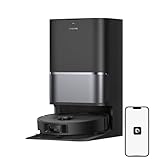
Dreame L40 Ultra
- High-Powered 25,000Pa Suction Performance: Powerfully clean hard floors and carpets with 25,000Pa suction…
- Tackle Corner Messes with Ease: L40 Ultra Gen 2 extends its brush and mop to reach corners and under…
- Less Manual Maintenance: All-in-one self-cleaning dock streamlines the autonomous cleaning experience…
$569.98

Check Today’s Price on Amazon
The Dreame L40 Ultra covers up to 1,948 sq ft per charge and stores 4 floor maps — enough for a large home with basement, ground floor, and two upper levels.
For a full comparison of models built specifically for oversized floor plans, see our full guide to the best robot vacuum for large house.
Why we picked it:
- 4 floor maps with intelligent automatic recognition and floor-switching in the app
- 149°F mop washing in the dock kills bacteria between runs — important when you’re mopping kitchen floors on level 1 and bathrooms on level 2
For a full assessment of its dock performance and mapping reliability, read our Dreame L40 Ultra review - Detects and avoids 100+ obstacle types — usable in homes with kids and toys scattered across floors
Pros:
- 11,000 Pa suction handles deep carpet cleaning on any level
- Extendable side brush for edge coverage
- Large water tank supports mopping up to 1,948 sq ft without refilling
- Excellent battery life — covers two full floors on one charge in most homes
Cons:
- Dock footprint is bulky — plan for at least 18″ of clearance on all sides
- App can feel less polished than Roborock’s at initial setup
Best for: Families with large multi-floor homes who want premium features at a mid-range price when purchased on sale.
Our Black Friday robot vacuum deals guide covers when those sales usually land and how to check a crossed-out price.
Check our best vacuum mop combos guide for how the L40 Ultra compares to other combo options.
4. Eufy Omni S2: Best Mopping Across Multiple Floors
Sale

Eufy Omni S2
- 𝟗𝟗.𝟗𝟗% 𝐆𝐞𝐫𝐦 𝐑𝐞𝐦𝐨𝐯𝐚𝐥 𝐨𝐧 𝐇𝐚𝐫𝐝𝐰𝐨𝐨𝐝 𝐚𝐧𝐝 𝐓𝐢𝐥𝐞: Generates electrolyzed water on every pass—killing 99.99% of bacteria. Works as…
- 𝟗𝟓% 𝐃𝐮𝐬𝐭 𝐌𝐢𝐭𝐞 𝐑𝐞𝐦𝐨𝐯𝐚𝐥-𝐁𝐚𝐛𝐲 𝐂𝐫𝐚𝐰𝐥𝐬 𝐖𝐨𝐫𝐫𝐲-𝐅𝐫𝐞𝐞: This carpet cleaner machine uses AeroTurbo 2.0 with 30,000 Pa…
- 𝐀𝐥𝐥𝐞𝐫𝐠𝐞𝐧 𝐅𝐢𝐥𝐭𝐫𝐚𝐭𝐢𝐨𝐧 𝐚𝐧𝐝 𝐁𝐮𝐢𝐥𝐭-𝐈𝐧 𝐅𝐫𝐚𝐠𝐫𝐚𝐧𝐜𝐞 𝐃𝐢𝐟𝐟𝐮𝐬𝐞𝐫: Multi-cone 5-layer filtration…
The Eufy Omni S2 takes a different approach to mopping: instead of spinning pads, it uses a HydroJet 2.0 roller mop that applies 15N of downward pressure at 240 RPM — closer to how a real mop works than anything else in this category.
If you have hardwood, tile, or LVP flooring on multiple levels, this is the cleaner to look at.
Why we picked it:
- HydroJet roller mop delivers 3x the scrubbing pressure of standard spinning mop pads
- Stores up to 5 floor maps with automatic floor recognition
- 12-in-1 UniClean Station handles auto-empty, mop washing with ozone cleaning, heated drying, detergent dispensing, and wastewater collection — no mess, no maintenance
Pros:
- Ozone cleaning in the dock sanitizes the mop between floor changes
- 3D MatrixEye obstacle avoidance reliable across different floor environments
- up to 180-minute battery — cleans two full floors on one charge
Cons:
- Roughly 50% pricier than the outgoing S1 Pro” and “Scent diffuser and full water-refill automation are locked to the pricier bundle SKUs
Best for: Homeowners with hardwood or tile floors on multiple levels who prioritize deep mopping over carpet cleaning.
Pairs well with a proper hardwood floor care routine.
5. Roborock Qrevo S5V: Best Mid-Range Pick

Roborock Qrevo S5V
- 𝟭𝟮,𝟬𝟬𝟬𝗣𝗮 𝗛𝘆𝗽𝗲𝗿𝗙𝗼𝗿𝗰𝗲 𝗦𝘂𝗰𝘁𝗶𝗼𝗻: Powered by a brushless motor, the Roborock Qrevo S5V delivers intense 12,000Pa suction to lift embedded dirt, pet hair, and stubborn debris from carpets, rugs, and hard floors…
- 𝗔𝗹𝗹-𝗶𝗻-𝗢𝗻𝗲 𝗦𝗺𝗮𝗿𝘁 𝗗𝗼𝗰𝗸 𝘄𝗶𝘁𝗵 𝗪𝗮𝗿𝗺 𝗔𝗶𝗿 𝗗𝗿𝘆𝗶𝗻𝗴 – 𝗥𝗲𝘃𝗼𝗹𝘂𝘁𝗶𝗼𝗻𝗶𝘇𝗲 𝗵𝗮𝗻𝗱𝘀-𝗳𝗿𝗲𝗲 𝗰𝗹𝗲𝗮𝗻𝗶𝗻𝗴: auto-empties…
- 𝗦𝗚𝗦-𝗖𝗲𝗿𝘁𝗶𝗳𝗶𝗲𝗱 𝗭𝗲𝗿𝗼-𝗧𝗮𝗻𝗴𝗹𝗲 𝗦𝘆𝘀𝘁𝗲𝗺: Say goodbye to hair wrap-ups! The rubberized floating main brush adapts to floors while resisting tangles, paired with an arc-shaped side brush (0% hair tangling rate…
The Qrevo S5V sits squarely in the mid-range but punches above it.
Its standout feature is the FlexiArm — an extendable mop arm that reaches corners and edges traditional round robots can’t touch.
In multi-floor homes with varying layouts, that matters: a kitchen on floor 1 and a bathroom on floor 2 both benefit from proper edge mopping.
Why we picked it:
- 12,000 Pa suction handles hardwood, tile, and low-pile carpet on any floor
- FlexiArm edge mopping extends to reach baseboards and corners on every level
- Dual zero-tangle roller brush — zero hair tangles across 3,552 sq ft of mopping coverage
Pros:
- Up to 4 saved floor maps with per-floor room segmentation in the Roborock app
- Auto-empty dock + self-washing mops + hot air drying — mostly hands-free
- Mop lifts 10mm for carpet protection on any level
- Dual spinning mops at 200 RPM deliver solid mopping performance
Cons:
- Dock requires auto-refill water tank — needs to be near a water supply or manually refilled
- Not quite as thorough on deep-pile carpets as the CurvX or Saros 20
Best for: Busy families in two-story homes who want Roborock reliability and multi-floor mapping.
Also worth comparing to the best robot vacuums for thick carpet if you have heavy rugs upstairs.
6. Dreame D20 Air Plus: Best Budget Pick Under $400
Sale

Dreame D20 Air Plus
- 150 Days Hands-Free Cleaning — No More Dust Bin Dumps! Skip the mess for up to 150 days! D20 Plus…
- 13,000Pa Suction + DuoBrush — Say Bye to Tangled Hair D20 Plus comes with 13,000Pa Vormax suction (yeah…
- Vacuum & Mop Combo — Customize Water and Suction Levels One machine, two jobs. Vacuum and mop simultaneously…
$278.99
Check Today’s Price on Amazon
The Dreame D20 Air Plus is the lowest-cost way on this list to get real multi-floor mapping. It gives up a mop-washing dock and camera-based obstacle avoidance to get there. If vacuuming is the main job on every level, that’s the right trade.
Dreame rates the D20 Air Plus for up to 4 saved map levels, the same count as the Roborock and Dreame flagships above, so a three-story home with a finished basement still fits.
Why we picked it:
- LiDAR navigation scans each room and plans its route, the mapping type you want for saved multi-floor maps
- 20,000 Pa suction, per Dreame’s in-house lab figure (manufacturer claim), with automatic suction boost on carpet
- Self-empty base with a 4 L dust bag that Dreame rates for up to 120 days between changes (manufacturer claim)
Pros:
- Up to 150 minutes and 140 m² (about 1,500 sq ft) per charge from a 3,200 mAh battery, per Dreame (manufacturer claim)
- 94.7 mm (3.7 in) tall, so it slides under most sofas and beds on every floor (manufacturer claim)
- Anti-tangle main brush and angled side brush, built to cut down on hair wrap
- Works with Alexa, Google Home, and Siri, and you can set the floor direction so it cleans along hardwood seams
Cons:
- No camera-based obstacle avoidance. LiDAR handles walls and furniture, but pick up cables, socks, and pet toys before a run
- Basic mopping: a flat pad and a 280 mL water tank, with no mop washing or drying at the base
- The base stays on one floor. Upstairs, everything goes into the 220 mL onboard bin, which you empty by hand
- Dreame measured the 140 m² figure in the quietest suction mode, so expect less coverage per charge on higher power
Best for: First-time robot vacuum buyers in a two- or three-story home who want saved floor maps and auto-emptying without paying for a mop-washing station.
Want more low-cost options?
Our best budget robot vacuum guide covers the wider field.
And if noise on upper floors at night is a concern, see our best silent robot vacuums.

Common Mistakes When Using a Robot Vacuum on Multiple Floors
- Buying a robot that only saves 1 or 2 maps — many mid-range robots (especially camera-only models) cap out at 1–2 saved maps. In a 3-story home, that means constant re-mapping.
Always verify the map count in spec sheets before buying. - Thinking you need a base station on every floor — you don’t. One base station is enough. Carry just the robot to each floor.
The dock stays put on your primary level and the robot re-localizes itself when it lands on a mapped floor. - Skipping the initial full-mapping clean on each floor — put the robot down, let it do a complete mapping run on every floor before scheduling anything.
Partial maps cause missed rooms, stuck robots, and frustrated re-maps.
Budget 30–45 minutes per floor for this one-time setup. - Placing the base station near stairs or high-traffic doorways — the robot needs a stable, predictable approach path to dock.
A base that gets bumped or shifted by kids and pets causes docking failures across all floors, not just the one it lives on. - Ignoring per-floor scheduling — most people set one schedule and leave it.
The better approach: schedule the kitchen/living floor for 7 AM on weekdays, bedrooms for 10 AM on Saturdays.
Every model in this list supports per-floor scheduling.
It takes 10 minutes to set up and saves hours of manual intervention.
How We Research
We analyzed specifications across 30+ robot vacuum models released between 2024 and early 2026, cross-referenced manufacturer documentation, and reviewed 500+ verified user reports.
We specifically filtered for models with confirmed LiDAR navigation, and documented multi-floor map support.
Products were ranked by their multi-floor workflow reliability first, raw cleaning performance second.
For our full method and scoring rubric, see our review methodology.
Update history:
October 4, 2026: Replaced pick #2, the Roborock S8 MaxV Ultra, with the Roborock Saros 20, Roborock’s current flagship with documented multi-floor mapping.
October 13, 2026: Replaced pick #6, the Yeedi M14+, with the Dreame D20 Air Plus.
Choose in 60 Seconds
- If you want the best all-around → Roborock Qrevo CurvX
- If you want the fewest interruptions on every level and budget isn’t the constraint → Roborock Saros 20
- If your home is 2,000+ sq ft across 2–3 floors and you want value → Dreame L40 Ultra
- If you have hardwood or tile floors on every level and mopping is the priority → Eufy Omni S2
- If you want Roborock reliability → Roborock Qrevo S5V
- If you’re trying multi-floor robot vacuuming for the first time and want to keep costs low → Dreame D20 Air Plus
- If you have thick carpet upstairs and hard floors downstairs → Roborock Qrevo CurvX (22,000 Pa handles both)
Who This Is For / Not For
This is for you if:
- You have 2 or more floors and want to automate cleaning across all of them
- You’re a busy parent or professional who genuinely can’t vacuum daily
- You’re tired of carrying a full-size vacuum up and down stairs
- You want per-floor cleaning schedules you can set and forget
- You have a mix of hard floors and carpet across different levels
This is NOT for you if:
- You live in a single-story home — you’d be overpaying for multi-floor map features you won’t use.
- You have very thick, high-pile carpet throughout — most robot vacuums struggle here regardless of floor count.
See dedicated carpet-focused picks. - You need a stair-climbing robot — that technology isn’t mainstream yet (Eufy’s MarsWalker is still emerging).
You’ll always need to carry the robot between floors. - You are not sure whether a robot vacuum is right for you at all – our robot vacuum vs regular vacuum guide covers the decision from scratch.
Frequently Asked Questions
No. Robot vacuums cannot climb stairs — they will stop at the edge.
You carry the robot between floors manually.
Once placed on a floor it has already mapped, it recognizes its location and starts cleaning without any additional setup.
The base station typically stays on one floor.
Most LiDAR-based robot vacuums support 3 to 4 saved floor maps.
Roborock and Dreame premium models support up to 4.
The Eufy Omni S2 supports up to 5.
Budget models vary — always check the spec sheet before buying.
No. One base station is enough for a multi-floor home.
Keep it on your main floor and carry just the robot to other floors.
The robot will clean and then wait for you to return it to its dock, or — if you have a second dock on another floor — dock itself there.
A second dock is optional, not required.
If you’re creating a new map for a floor it hasn’t seen, expect 30–45 minutes for a standard 1,000–1,500 sq ft floor.
Once the map is saved, the robot re-localizes in under 60 seconds on subsequent visits — it’s recognizing a saved map, not creating a new one.
Yes — all six models in this guide support per-floor schedules through their apps.
You can set the ground floor to clean at 7 AM on weekdays and bedrooms to clean at 10 AM on Saturdays.
This is one of the biggest time-saving features for multi-floor households.
The Roborock Qrevo CurvX or Dreame L40 Ultra are the best options for 3-story homes, as both support 4 saved floor maps: enough for a basement, main floor, and upper floor.
The CurvX also recognizes which floor it’s on automatically, so you don’t have to switch maps by hand when you carry it between levels.
Yes. The robot distinguishes floors based on the full spatial fingerprint of the room — furniture positions, wall distances, room shapes — not just size.
Even two similarly laid-out floors will have enough differences for a LiDAR-based robot to tell them apart.
If you rearrange furniture significantly, you may need to re-map that floor.
If you use Alexa, Google Home, or a home automation hub, yes — you can trigger floor-specific cleaning runs by voice or automation.
For example: “Alexa, ask Roborock to clean the upstairs bedroom” works natively.
For full smart home integration options, see our guide to setting up a smart home with Alexa.
Summary
For most busy households, a robot vacuum for multiple floors comes down to two decisions: how many floors you have and how much hands-free automation you want.
The Roborock Qrevo CurvX covers the majority of multi-floor homes — 4 saved maps, 22,000 Pa suction, and an app built for floor-by-floor scheduling.
If you’re on a tighter budget, the Dreame D20 Air Plus proves you don’t need a flagship to get real multi-floor mapping.
And if your floors are mostly hard surfaces that need actual mopping, the Eufy Omni S2‘s HydroJet system is genuinely better than anything else in this category.
Whatever you pick, the setup is the same: map each floor once, build your schedule, and let the robot handle it.
For more help comparing your options, browse our full vacuum cleaners and floor care category or head back to the EverydayHomeComfort home page to explore other home comfort topics.
Still unsure?
Start with the Roborock Qrevo CurvX — it covers 90% of multi-floor use cases and you won’t need to upgrade it anytime soon.
If pet hair is your main concern alongside the multi-floor challenge, check out our dedicated guide to the best robot vacuums for pet hair.
And if your home has wet-dry cleaning needs beyond what a robot can handle, our wet-dry vacuum analysis is worth a read too.