Ad. When you purchase through links we provide, we may receive an affiliate commission. Here's how it works.
Best Smart Home Motion Sensor 2026: Top 5 Picks Compared

TL;DR: The Best Smart Home Motion Sensor
The best smart home motion sensor for most homes is the Aqara Motion Sensor P1: it runs about five years on two coin cells, lets you set a 1 to 200 second timeout, and fires local automations in under a second.
If you have pets over 50 pounds or want lights that stay on while you sit still, step up to the Aqara Presence Sensor FP2, a 60 GHz radar sensor with zone exclusion.
Each pick below connects to a mainstream platform and solves one situation: fast automations, pet-heavy homes, quick setup, premium integration, or all-in-one sensing.
Quick Picks: Top Recommendations
- Aqara Motion Sensor P1 – best overall: five-year battery, adjustable timeout, fast local automations for any Zigbee hub.
- Ring Motion Detector – best for pet owners who want security: ignores most pets under 50 pounds, ties into Ring cameras and Alexa.
- SwitchBot Smart Motion Door Sensor – best for easy setup: a working motion-to-light automation in minutes.
- Aqara Presence Sensor FP2 – best premium presence sensor: 60 GHz radar that detects people sitting still and excludes pet zones.
- Zooz Q Sensor ZSE11 – best multi-sensor: motion plus temperature, humidity, and light in one Z-Wave 800 unit.

Key Takeaways
- A PIR motion sensor detects a warm body moving across its lens. It is inexpensive, runs on batteries for years, and fires the instant you move.
- A mmWave presence sensor uses 60 GHz radar to catch movement as small as breathing, so lights stay on while you read. It needs constant power.
- Pet immunity is not a spec. It comes from mounting height, angle, and the animal’s weight and distance from the lens.
- Most smart motion sensors need a hub. Wi-Fi and Thread models can skip the separate hub; Zigbee and Z-Wave models cannot.
- The Department of Energy links occupancy-based lighting controls to energy savings of 10 to 90 percent, depending on the room.
How a Smart Home Motion Sensor Works: PIR vs mmWave
Almost every smart home motion sensor uses one of two technologies.
A passive infrared (PIR) sensor watches for a warm object crossing a segmented lens, so it triggers the instant you move from one zone to the next.
PIR is inexpensive, sips power, and reacts fast, which is why hallway and entry sensors almost always use it.
The catch: if you stop moving, PIR stops seeing you, so lights switch off while you sit at a desk.
A mmWave presence sensor sends out 60 GHz radar and reads the reflections, catching motion as small as your chest rising and falling.
It knows you are still in the room when you are motionless, but it needs a power cable and a fussier setup.
The occupancy sensor category covers both.
Use PIR for hallways, closets, and entries.
Use mmWave for offices and reading nooks where people sit still.
The Department of Energy reports that occupancy-based lighting controls cut lighting energy use by anywhere from 10 to 90 percent, depending on the room and how it is used.
Do Smart Motion Sensors Need a Hub?
Most do.
Zigbee sensors like the Aqara P1 and Z-Wave sensors like the Zooz Q Sensor ZSE11 need a hub to translate their radio signal: an Aqara or Hue bridge, a SmartThings or Hubitat hub, a Ring Alarm base station, or Home Assistant with a USB radio stick.
Wi-Fi sensors like the Aqara FP2 connect straight to your router.
Thread and Matter sensors such as the Aqara P2 need a Thread border router, which many smart speakers already include, then appear in Apple Home, Google Home, Alexa, and SmartThings without a brand bridge.
The Connectivity Standards Alliance governs Matter and Zigbee, and the Z-Wave Alliance certifies Z-Wave.
Our Zigbee vs Z-Wave vs Matter comparison explains which protocol fits which home, and our guide to the best hub for home automation covers your options.

Pet Immunity: What Actually Stops False Alarms
Manufacturers print “pet friendly” on the box, but on a PIR sensor that behavior comes from three things you control.
- Height and angle: mount the sensor 6 to 8 feet up and tilt it down so its lower lens zones point above a walking pet.
- Distance from the lens: a cat on a shelf 2 feet away fills the frame and triggers it, whatever the box says.
- Animal weight: a rating to ignore pets under 50 pounds assumes the pet is on the floor and across the room.
The Ring Motion Detector has the best PIR pet handling here, with sensitivity tiers for pets under 30 and under 50 pounds.
Above that, physics wins.
No PIR motion sensor reliably ignores a dog over about 50 pounds, and that is exactly the point where a mmWave presence sensor becomes the better choice.
The Aqara FP2 lets you exclude the floor zone on a floor plan, so a Labrador wandering through never registers as presence while a person on the couch does.
If pet mess is the bigger battle, our best air purifier for pets and our best robot vacuum for pet hair handle the hair side.
Setup Speed: How Fast You Get a Working Automation
- SwitchBot Smart Motion Door Sensor: minutes.
Pair over Bluetooth, mount it magnetically, set the light threshold in the app. - Ring Motion Detector: minutes, if you own a Ring hub.
Scan the QR code, place it, set your modes. - Aqara Motion Sensor P1: 15 to 30 minutes.
Add the Aqara hub, pair the sensor, build the automation. - Zooz Q Sensor ZSE11: 30 minutes or more.
Z-Wave inclusion, then parameter tuning. - Aqara Presence Sensor FP2: 30 minutes or more, and the Wi-Fi step trips people up.
The Aqara FP2 has to be paired on a dedicated 2.4 GHz Wi-Fi network, and skipping that step is the single most common reason FP2 setups fail.
Create a temporary 2.4 GHz-only network name, pair the sensor, and it holds afterward.
Once a sensor is online, pair it with the best smart bulbs for motion-activated lighting.
Ecosystem Lock-In and Where Your Motion Data Lives
A motion sensor logs when you are home and which rooms you use, so where that log lives matters.
The Aqara FP2 and Zigbee or Z-Wave sensors on a local hub like Home Assistant keep motion events inside your house.
The Ring Motion Detector routes events through Ring servers, and its history features expect a Ring Protect plan.
Every motion event from the Ring Motion Detector stays locked inside the Ring and Alexa world, so if you run Apple Home or Google Home, this sensor cannot talk to them.
Matter changes that: a Matter-over-Thread sensor moves between Apple Home, Google Home, Alexa, and SmartThings without new hardware.
Our Alexa vs Google Home breakdown and our end-to-end encryption explainer dig into what each platform does with your data.
Smart Home Motion Sensor Comparison
Here is how the five picks compare on the specs that decide daily performance.
| Product | Best for | Detection | Protocol | Hub required | Pet immunity | Range & FOV | Extra sensors | Battery & life | Works with |
|---|---|---|---|---|---|---|---|---|---|
| Aqara Motion Sensor P1 | Best overall | PIR | Zigbee 3.0 | Yes (Aqara, SmartThings, Hubitat, Home Assistant) | Not rated; tune mount and timeout | 170° at 4 m, 150° at 7 m | Ambient light | 2x CR2450, up to 5 yr | HomeKit, Alexa, Google via hub |
| Ring Motion Detector | Pet owners + security | PIR | Wi-Fi / Amazon Sidewalk | Yes (Ring hub or Alarm base) | Yes; adjustable pet settings | Full room, up to 30 ft | None | Battery powered | Ring + Alexa |
| SwitchBot Smart Motion Door Sensor | Easy setup | PIR | Bluetooth (SwitchBot Hub) | Yes (SwitchBot Hub) | Not rated | 110° horizontal / 55° vertical, up to 9 m (30 ft) | Light | 2x AAA, up to 3 yr | Alexa, Google, Apple Home via Hub |
| Aqara Presence Sensor FP2 | Premium presence | 60 GHz mmWave | Wi-Fi 2.4 GHz | No (wired USB-C) | Zone exclusion; any pet size | 120°, about 6 m radius, up to 30 zones | Light, multi-person, fall detection | Wired, no battery | HomeKit, Alexa, Google, SmartThings, Home Assistant |
| Zooz Q Sensor ZSE11 | Multi-sensor | PIR | Z-Wave 800 Long Range | Yes (Z-Wave hub) | Adjustable thresholds; not rated | 110°, up to 40 ft | Temp, humidity, light | 2x AAA, or USB | SmartThings, Home Assistant, Hubitat; no HomeKit |
Aqara Motion Sensor P1: Best Overall
Sale

Aqara Motion Sensor P1
- [NOTES] Requires Aqara Zigbee 3.0 hub (Not compatible with other Zigbee hubs). Requires a secured 2.4 GHz…
- [5-Year Battery Life] The Zigbee motion sensor boasts an impressive five-year battery life, maintaining…
- [Configurable Detection Timeout] Easily adjust the Aqara motion sensor timeout without any hardware…
A tiny battery-powered Zigbee PIR sensor that reports motion and ambient light to a hub.
Why we picked it:
- Five-year battery life from two CR2450 coin cells, backed by consistent long-term owner reports.
- Configurable 1 to 200 second timeout, so you set how long lights stay on after motion stops.
- Runs locally on an Aqara, Hubitat, or Home Assistant Zigbee mesh, so automations fire in under a second.
Real-world scenario:
In a two-bedroom apartment, you put a P1 in each hallway corner, set a 60-second timeout, and the lights just work at night for years.
Pros:
- Genuinely long battery life
- Small enough to hide on a door frame
- Adjustable sensitivity and timeout, sold in multipacks
Cons:
- Needs a Zigbee hub, and pairs most reliably with Aqara’s own
- No temperature sensor, and a short cooldown limits instant re-triggering
The Aqara Motion Sensor P1 is the best smart home motion sensor for most homes because it pairs a five-year battery, a configurable 1 to 200 second timeout, and fast local automations in one hideable puck.
Best for:
Anyone with a Zigbee or Home Assistant hub who wants reliable, low-maintenance automations.
It fits the busy professional and parent especially well.
Ring Motion Detector: Best for Pet Owners Who Want Security
Sale
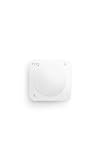
Ring Motion Detector
- Instant motion-activated alerts — One sensor watches an entire room (9.1 meter range, 90° field of…
- Pet-friendly — Customize settings to reduce false alerts from pets under 50 lbs.
- No base station required — connects over Amazon Sidewalk for simple, flexible coverage throughout your…
A PIR security sensor that connects to a Ring hub and integrates with Ring cameras and Alexa.
Why we picked it:
- The Ring Motion Detector has the best PIR pet handling here, with adjustable pet-friendly sensitivity settings.
- Covers a full room out to about 30 feet, and it pairs in under a minute if you own a Ring system.
Real-world scenario:
You have a 40-pound dog and travel for work.
In Away mode it flags a person crossing the living room while the dog on the floor does not.
Pros:
- Strong pet immunity when corner-mounted correctly
- Simple pairing inside the Ring app
- Tight integration with Ring cameras and Alexa Routines
Cons:
- Locked to Ring and Alexa; no HomeKit, no Google Home
- History features expect a paid Ring Protect plan, and a slow re-arm makes it poor for snappy lighting
Best for:
Households that already run a Ring system and want motion sensing that doubles as security.
It fits the apartment or suburban pet owner.
SwitchBot Smart Motion Door Sensor: Best for Easy Setup

SwitchBot Smart Motion Door Sensor
- [Motion Sensor Detects Your Movements] With a motion detection range of up to almost 30 feet within…
- [Motion Sensor Detects Your Movements] With a motion detection range of up to almost 30 feet within…
- [Part of SwitchBot Ecosystem & Compatible with Alexa] Connect Motion Sensor with other SwitchBot products…
A Bluetooth PIR sensor with a built-in light sensor, designed to pair with the SwitchBot Hub for full smart home integration.
Why we picked it:
- One of the fastest paths to a working motion-to-light automation of any sensor here.
- A built-in light sensor, so lights only trigger when the room is actually dark.
- A magnetic base that lets you aim it without tools, plus an adhesive option for flat mounting.
Real-world scenario:
A time-pressed parent pairs the sensor over Bluetooth, sticks it in the nursery doorway, and the night light comes on when you walk in with an armful of laundry.
Pros:
- Setup in minutes, no technical knowledge
- Light sensor included, magnetic mount for tool-free aiming
- Works with Alexa, Google, and Apple Home through the SwitchBot Hub
Cons:
- No temperature sensor, and it needs the SwitchBot Hub for Alexa, Google, or Apple Home integration
- No presence hold, so lights can drop while you are still in the room
Best for:
Anyone who wants the shortest setup without being locked into one lighting brand.
It pairs naturally with a best smart thermostat as a first automation stack.
Aqara Presence Sensor FP2: Best Premium Presence Sensor
Sale

Aqara Presence Sensor FP2
- [Installation Method] With the new installation method for the FP2, you can now mount it in the corner of…
- [Multi-Person &Zone Positioning] The Aqara Presence Sensor FP2 can simultaneously detect up to 5 people…
- [Sleep monitoring& Fall Detection] You can install FP2 next to the bed and select the sleep monitoring…
A wired 60 GHz mmWave radar sensor that detects presence, tracks up to five people, and maps up to 30 zones.
Why we picked it:
- Keeps lights on while you sit still, which PIR cannot do.
- Zone exclusion ignores a pet on the floor while still detecting a person on the couch.
- Processes locally and exposes to HomeKit, Alexa, Google, SmartThings, and Home Assistant.
Real-world scenario:
With hardwood floors, a big sectional, and a golden retriever, the FP2 above the doorway keeps the reading lamp on while you sit motionless with a book.
Pros:
- Best-in-class presence accuracy
- Multi-zone and multi-person tracking from one device
- No batteries to replace, broad platform support with local processing
Cons:
- Wi-Fi pairing fails on combined 2.4 and 5 GHz networks, and it needs USB-C power at every location
- Zone calibration drifts after you move furniture
Best for:
Premium, integrated smart homes and any household with large or multiple pets.
Zooz Q Sensor ZSE11: Best Multi-Sensor

Zooz Q Sensor ZSE11
- 4 SMART SENSORS: NEW 800LR version with improved hardware. Get motion alerts and monitor temperature…
- FLEXIBLE MOUNT: Use the included mounting bracket to adjust the sensor’s field of view and ensure precise…
- Z-WAVE COMPATIBILITY: Most basic Z-Wave systems aren’t advanced enough to display multisensors correctly…
A Z-Wave 800 series sensor that combines motion, temperature, humidity, and light in one housing.
Why we picked it:
- Four sensors in one, so a single device feeds a whole room’s automations and dashboard data.
- Z-Wave 800 Long Range reach and mesh reliability, on two AAA cells or continuous USB power.
Real-world scenario:
You run Home Assistant, want your hardwood between 40 and 55 percent humidity, and want motion-triggered lighting in that room.
One Zooz Q Sensor ZSE11 covers it.
Pros:
- Motion plus temperature, humidity, and light sensing
- Strong Z-Wave range and reliability
- USB or battery power, a favorite of Home Assistant users
Cons:
- Parameter setup is not beginner-friendly, and temperature and humidity readings need offset calibration
- Battery life falls short of claims with frequent reporting
Best for:
Z-Wave and Home Assistant power users who want one device to do everything.
Common Mistakes Buyers Make
- Mounting the sensor at eye level: PIR works best 6 to 8 feet up, angled down.
Lower than that, it misses you crouching and catches every passing pet. - Buying a Zigbee or Z-Wave sensor with no hub: these radios cannot reach your phone.
Confirm you own a compatible hub, or pick a Wi-Fi or Thread model. - Using PIR where people sit still: lights will switch off on you.
Rooms with desks and sofas need a mmWave presence sensor. - Ignoring the daylight threshold: with no light-level condition, the sensor turns lights on at noon.
Set a lux threshold. - Trusting the pet friendly label alone: pet immunity depends on install height, angle, and distance.
A cat close to the lens triggers any PIR sensor.
What Happens If You Choose Wrong
- If you mount a PIR sensor at eye level, it fires when your dog walks past and misses you crouching for a toy: false alerts and dead automations at once.
- If you buy a Zigbee sensor without a hub, it sits in a drawer with nothing to connect to.
- If you put a PIR sensor in your home office, the lights go dark every time you stop typing to think.
- If you trust an ignores-pets-under-50-pounds claim for a 70-pound dog, you get alerts every time the dog shifts, until you silence the app.
How We Research
We analyzed published specifications for 10 popular motion sensors across Zigbee, Z-Wave, Wi-Fi, and Thread.
We cross-referenced manufacturer documentation with long-term owner reports from smart home communities, focusing on battery life, false-alarm behavior, and setup friction.
Our picks reflect documented specs, guidance from the Department of Energy and the Connectivity Standards Alliance, and consistent patterns in verified owner feedback, not our own lab trials.
For our full method and scoring rubric, see our review methodology.
Choose in 60 Seconds
- If you have a Zigbee or Home Assistant hub and want set-and-forget automations, buy the Aqara Motion Sensor P1.
- If you own a Ring Alarm system and a medium-size dog, buy the Ring Motion Detector.
- If you want setup done in five minutes without committing to one lighting brand, buy the SwitchBot Smart Motion Door Sensor.
- If you have premium floors, a large dog, or rooms where people sit still, buy the Aqara Presence Sensor FP2.
- If you run Home Assistant and want motion plus climate data from one device, buy the Zooz Q Sensor ZSE11.
- If you are all-in on Matter with a Thread border router, buy the Aqara Motion and Light Sensor P2 instead of the P1.
Who This Is For and Not For
This is for you if:
- You want lights, alerts, or scenes that react to people moving through your home.
- You already own or are willing to add a smart home hub.
- You have pets and need to control false alarms.
- You care about which ecosystem your devices lock you into.
This is NOT for you if:
- You want a standalone alarm siren with no app or hub.
- You rent and cannot mount anything, since some of these need screws or a power cable.
- You expect motion sensing to keep working during an internet outage on a cloud-only system.
Frequently Asked Questions
What is the best smart home motion sensor for pet owners?
For most pet owners, the Ring Motion Detector is the best PIR option because it has adjustable pet-friendly sensitivity settings and handles corner mounting well.
Picture a home with a 40-pound beagle: mounted 7 feet up in a corner and angled down, it flags a person crossing the living room but ignores the dog on the floor.
Pet immunity on any PIR sensor breaks down as animals get bigger or climb furniture.
If you have a dog over 50 pounds, multiple pets, or cats that jump onto shelves near the sensor, switch to a mmWave presence sensor like the Aqara FP2.
It lets you draw exclusion zones on a floor plan, so floor-level movement never counts as presence while a person on the couch does.
Our recommendation: start with the Ring detector if your pet is small and you own a Ring system, and move to the FP2 once false alarms become a pattern.
Mounting height and distance from the lens matter more than any label on the box.
Do smart home motion sensors need a hub to work?
Most do.
Zigbee sensors like the Aqara Motion Sensor P1, Z-Wave sensors like the Zooz Q Sensor ZSE11, and Bluetooth sensors like the SwitchBot Smart Motion Door Sensor all use low-power radio protocols that your phone and router cannot read directly.
They need a hub to translate: an Aqara hub, a SwitchBot Hub, a SmartThings or Hubitat hub, a Ring Alarm base station, or a Home Assistant install with a USB radio stick.
For example, a SwitchBot Motion Sensor paired to a SwitchBot Hub can trigger other SwitchBot devices on its own, but to trigger anything else you route it through Alexa, Google Home, or Apple Home.
Wi-Fi sensors like the Aqara FP2 connect straight to your router and skip the separate hub, though you still need an app or platform to act on the motion.
Thread and Matter sensors such as the Aqara P2 need a Thread border router, which many newer smart speakers already contain, and then appear across Apple Home, Google Home, Alexa, and SmartThings without a brand bridge.
If you do not own a hub yet, decide on your platform first, then buy sensors that match it.
PIR vs mmWave presence sensors: which one should you choose?
Choose PIR for rooms people move through and mmWave for rooms people sit in.
A passive infrared (PIR) sensor detects a warm body crossing its segmented lens, so it fires instantly when you walk in and stops seeing you when you hold still.
That makes it perfect for hallways, entries, closets, stairs, and garages, and it runs on batteries for years.
A mmWave presence sensor uses 60 GHz radar to detect movement as small as breathing, so it knows you are still in a room even when you are motionless at a desk or on a sofa.
The trade-offs: mmWave sensors like the Aqara FP2 need constant USB power and take longer to calibrate.
As a rule, put PIR sensors in your hallway and laundry room, and put a presence sensor in your home office and reading corner so the lights never drop while you are thinking.
Many homes use both.
If you can only pick one type for a living space where people relax, choose mmWave, because that accuracy stops the most annoying smart-lighting failure.
Do smart motion sensors still work during a Wi-Fi or power outage?
It depends on the system.
Battery-powered Zigbee and Z-Wave sensors keep running during a power outage as long as their hub has power, for example a hub on a small battery backup.
They also keep working during an internet outage, because Zigbee and Z-Wave automations run locally on the hub without touching the cloud.
A Home Assistant setup with local automations behaves the same way.
Cloud-dependent systems are the weak point: a Wi-Fi sensor that reports to a manufacturer server, or a hub that processes automations in the cloud, goes dark when your internet drops.
The Ring Alarm system includes cellular backup on paid plans so the alarm function survives an internet outage, but third-party automations still fail.
The Aqara FP2 is wired, so it stops entirely in a power cut unless it is on a backup circuit.
If outage resilience matters to you, build on a local platform, put the hub and router on an uninterruptible power supply, and confirm your key automations run locally rather than through a cloud service.
Which motion sensors support Matter, Apple HomeKit, Alexa, and Google Home?
Support varies by model.
The Aqara Motion Sensor P1 works with Apple HomeKit, Alexa, and Google Home, but only through an Aqara hub, and it does not expose Matter natively.
The Aqara Motion and Light Sensor P2 does support Matter over Thread, so it appears in Apple Home, Google Home, Alexa, and SmartThings directly once you have a Thread border router.
The SwitchBot Smart Motion Door Sensor reaches Alexa, Google Home, and Apple Home through the SwitchBot Hub, and supports Matter only through a Matter-enabled Hub, not natively.
The Aqara FP2 supports HomeKit, Alexa, Google Home, SmartThings, and Home Assistant over Wi-Fi, though not Matter.
The Ring Motion Detector is the most limited: it works only with Ring and Alexa, with no HomeKit or Google Home path.
The Zooz Q Sensor ZSE11 connects through a Z-Wave hub such as SmartThings, Hubitat, or Home Assistant, and has no HomeKit support.
If cross-platform portability is your priority, choose a Matter-over-Thread sensor now, because it can move between ecosystems later without new hardware.
Summary: Picking Your Smart Home Motion Sensor
The best smart home motion sensor for most people is the Aqara Motion Sensor P1: a five-year battery, an adjustable 1 to 200 second timeout, and fast local automations make it the sensor you install and forget.
Pet owners on a Ring system should pick the Ring Motion Detector, Hue owners should pick the SwitchBot Smart Motion Door Sensor for its five-minute setup, and anyone with premium floors, big dogs, or sit-still rooms should step up to the Aqara FP2.
Home Assistant users who want motion plus climate data from one unit should choose the Zooz Q Sensor ZSE11.
Match the sensor type to the room, confirm you have the right hub, and mount PIR sensors high and angled down.
Still unsure?
Start with the Aqara Motion Sensor P1: it covers about 80 percent of homes.
For more picks, browse our smart devices reviews hub or head back to the EverydayHomeComfort home page.